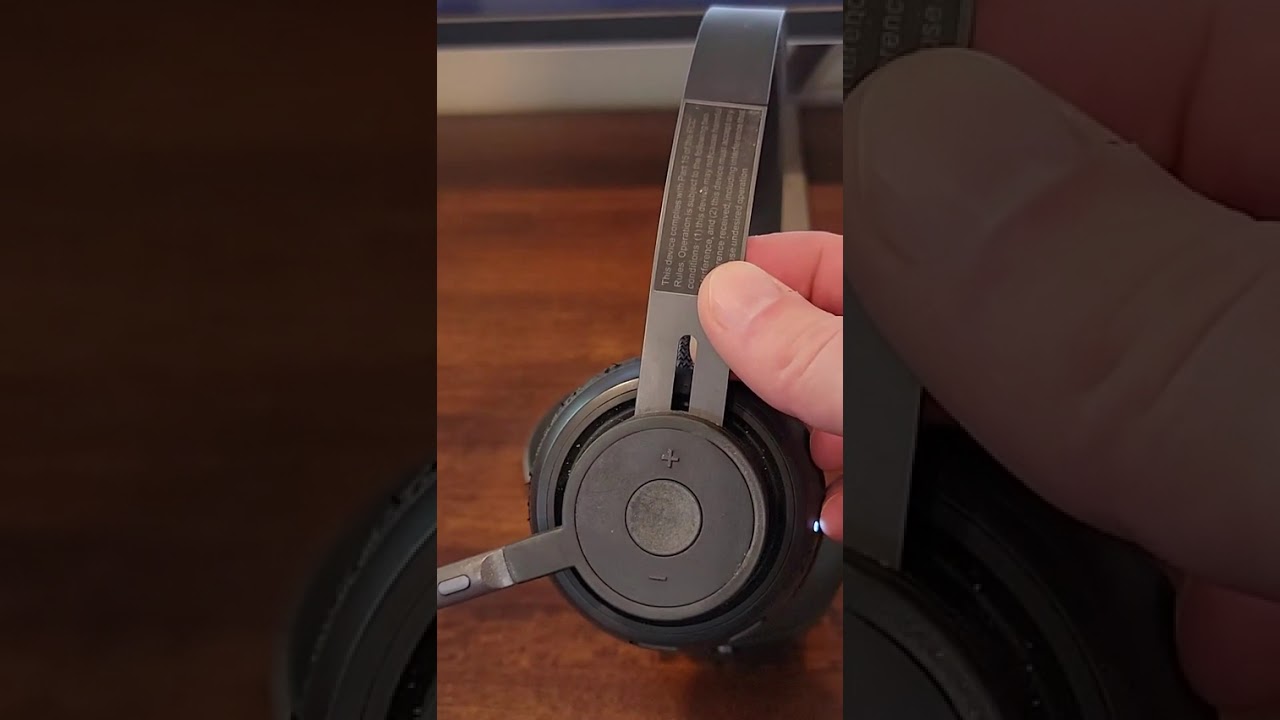
Logitech Zone 900 Overview and Features
The Logitech Zone 900 is an on-ear wireless Bluetooth headset designed specifically for professional and remote work environments, offering advanced noise-canceling capabilities that enhance call clarity and user experience. This headset has gained praise for its blend of innovative features, convenience, and versatility, making it a standout option among work headsets.
Advanced Noise Canceling Technology
One of the standout features of the Logitech Zone 900 is its advanced noise-canceling technology. This function plays a crucial role in minimizing background distractions during calls, which is essential for maintaining professionalism and focus during busy workdays. The noise canceling helps ensure that your voice is heard clearly without interference from ambient noise, a vital feature for both open office and home office settings.
Wireless Connectivity Options
The Zone 900 offers versatile wireless connectivity through both Bluetooth and a USB dongle. Users can choose their preferred method depending on convenience and device compatibility. Bluetooth connectivity allows for seamless pairing with laptops, smartphones, and tablets, making it easy to switch between devices.
A particularly useful feature is the ability to connect simultaneously to two Bluetooth devices. For example, you can have the headset connected to your computer for work calls and your smartphone for personal calls at the same time. The headset smartly weaves between audio sources, allowing you to manage calls and media without the need to disconnect and reconnect devices constantly.
Intuitive Controls for Calls and Volume
The headset design incorporates easily accessible controls on the ear cups, allowing users to :
-
Flip the microphone boom up to mute instantly – a quick and hygienic way to avoid coughing or sneezing into the microphone during calls.
-
Adjust volume up or down without needing to access the connected device.
These controls provide quick, tactile feedback and enhance the overall user experience, ensuring that adjustments can be made discreetly and efficiently during meetings.
Battery Life and Charging Convenience
The Zone 900 boasts an impressive battery life of approximately 10 to 12 hours on a single charge, which is sufficient for full workdays or extended conference calls. Additionally, the headset is compatible with a charging pad (sold separately), making it incredibly easy to keep the device powered throughout the day. When not in use, simply folding up the headset and placing it on the charging pad replenishes the battery swiftly, ensuring it is always ready for the next call.
This charging solution is economical and widely available, adding to the headset’s convenience for busy professionals who need reliable and quick power-ups between meetings.
Multi-Year Reliability and User Satisfaction
Users have reported long-term satisfaction with the Logitech Zone 900, with the headset performing reliably even after three years of daily use. This longevity, combined with the extensive feature set, positions the Zone 900 as a smart investment for professionals who depend on high-quality audio and robust connectivity tools.
Build Quality and Durability
The build quality of the Logitech Zone 900 headset is exceptional, especially considering its foldable design. Initially, there were concerns that the folding mechanism might feel cheap or be prone to breaking. However, extensive use over several years has proven these concerns unfounded, highlighting the headset’s durability and thoughtful engineering.
Robust Folding Mechanism
The Zone 900 features a foldable design that allows the headset to be compactly stored or transported when not in use. This folding mechanism is equipped with a sturdy snapping action that provides clear tactile feedback when opening and closing, ensuring that the headset stays securely in position during use.
Despite daily folding—estimated at around 12 times per day—the headset continues to function flawlessly after three years, with no signs of weakening or breakage. This robustness makes it ideal for users who frequently move between workspaces or travel and require a portable yet durable headset.
Material Quality and Comfort
While specific materials are not detailed in the transcript, the overall impression of the headset’s build quality is highly positive. The components feel solid, and the design balances durability with comfort, ensuring that the headset can be worn for extended periods without discomfort.
The on-ear style contributes to a lightweight feel, which, combined with the durable frame, offers an excellent balance of sturdiness and ease of wear. Users can confidently rely on the Zone 900 for daily use without worrying about the headset becoming a fragile or uncomfortable accessory.
Functional Design Elements
The design also incorporates practical features such as the flip-to-mute microphone boom, which is both intuitive and robust. This functionality is critical for professional use, allowing users to quickly mute themselves without fumbling for buttons or needing to access software controls.
The headset’s buttons for volume control and connectivity are well integrated into the design and resist wear over time, further emphasizing the quality and durability of the product.
Summary of Build and Durability Features
|
Feature |
Description |
User Experience |
|---|---|---|
|
Folding Mechanism |
Sturdy fold-up design with snapping action |
Reliable after years of daily use, no loosening or breakage |
|
Material Quality |
High-quality, durable materials (specific materials not detailed) |
Comfortable for extended wear, feels solid and premium |
|
Microphone Boom |
Flip-to-mute mechanism |
Quick, hygienic muting, easy to use, durable |
|
Controls |
Volume up/down buttons on ear cups |
Responsive and resistant to wear over time |
Mute Function and Controls
The Logitech Zone 900 headset offers intuitive and user-friendly controls that significantly enhance the user experience, particularly the mute function which is designed for convenience and quick access. One of the standout features is the mechanical mute toggle integrated into the headset’s design, which allows users to mute their microphone simply by flipping the boom arm up. This action instantly mutes your microphone and flips it down to unmute, providing a natural and tactile way to manage your audio during calls without fumbling for buttons or software controls.
Flip-to-Mute Design
The flip-to-mute feature is both practical and efficient. When you’re on a call and need to mute yourself—perhaps to cough or to speak privately—you just flip the microphone boom arm up. This physical movement mutes the microphone immediately, ensuring that no unwanted sounds are transmitted to the other end of the call. Flipping it back down un-mutes the microphone. This design is a huge benefit for professionals who need to mute frequently during meetings or calls, as it minimizes distractions and interruptions.
Additional On-Device Controls
Besides the mute function, the Logitech Zone 900 also includes volume control buttons conveniently located on the headset itself. These buttons allow users to adjust the audio volume directly without needing to access their computer or phone settings. The volume up and volume down buttons are within easy reach, enabling seamless control over your listening experience during a call or while streaming media.
-
Mute function : Flip the microphone boom arm up to mute, flip down to unmute.
-
Volume controls : Dedicated buttons for volume up and volume down on the headset.
Practical Usage Scenarios
Consider a scenario where you’re in a video conference and suddenly need to cough or speak to someone in the room without the call participants hearing. With the Logitech Zone 900, you simply flip the boom arm up, and you’re instantly muted. This eliminates the awkward fumbling for mute buttons on your computer or the risk of accidentally transmitting noise. Once you’re ready to speak again, flipping the boom back down reactivates the microphone immediately. This quick toggle feature is a game changer for busy professionals, making communication smoother and more professional.
In summary, the mute function and controls on the Logitech Zone 900 are designed to provide fast, reliable, and tactile control during calls, allowing users to focus on their conversations without distraction or technical hassle.
Connectivity Options : Bluetooth and USB Dongle
The Logitech Zone 900 is versatile in its connectivity options, offering both Bluetooth and USB dongle connections. This flexibility caters to a wide range of user preferences and device compatibility needs, making the headset suitable for various professional and personal use cases.
Bluetooth Connectivity
One of the most convenient features of the Logitech Zone 900 is its seamless Bluetooth connectivity. The headset can connect wirelessly to your computer or mobile device via Bluetooth, providing a cable-free experience that enhances mobility and reduces desk clutter. The Bluetooth connection is particularly easy to set up and use, making it an ideal choice for users who value simplicity and convenience.
Furthermore, the Logitech Zone 900 supports multipoint Bluetooth connectivity. This means it can simultaneously pair with two devices at once, such as a computer and a smartphone. This feature is especially useful for professionals who need to manage calls or audio from multiple sources without constantly switching connections manually. For example, you could be on a video conference call on your computer and still receive a call from your phone, with the headset intelligently weaving the audio streams in and out to keep you connected to both.
Benefits of Bluetooth Connectivity
-
Wireless freedom for greater mobility.
-
Easy and fast pairing with devices.
-
Multipoint connection supports two devices simultaneously.
-
Automatic reconnect feature enhances usability.
USB Dongle Option
In addition to Bluetooth, the Logitech Zone 900 also offers connectivity via a USB dongle. This USB connection is plug-and-play and provides a reliable, low-latency wireless connection that is particularly beneficial in environments with potential Bluetooth interference or where a more stable connection is required.
The USB dongle acts as a dedicated wireless receiver, ensuring that the audio and microphone signals are transmitted without interruption. For users who prioritize minimal latency for clearer voice communication or prefer a more stable connection without relying on the Bluetooth stack of their device, the USB dongle is a valuable alternative.
When to Use the USB Dongle
-
In crowded wireless environments where Bluetooth interference is common.
-
When ultra-low latency is critical, such as during professional calls or recordings.
-
For devices that do not support Bluetooth or have limited Bluetooth functionality.
Charging and Battery Life Considerations
While not directly related to connectivity, it is worth noting that the Logitech Zone 900 offers a robust battery life of around 10 to 12 hours on a full charge. The headset can be conveniently charged using a charging pad (sold separately), which makes maintaining power effortless. The user mentioned that after calls, simply folding the headset and placing it on the charging pad quickly restores the battery, ensuring the device is ready for the next use.
Summary Table of Connectivity Features
|
Connectivity Option |
Advantages |
Best Use Cases |
|---|---|---|
|
Bluetooth |
|
|
|
USB Dongle |
|
|
Overall, the Logitech Zone 900’s dual connectivity options provide users with the flexibility to choose the best connection mode that fits their work environment and device compatibility, ensuring a seamless, reliable, and professional audio experience.
Multi-Device Bluetooth Pairing
The Logitech Zone 900 wireless Bluetooth headset stands out remarkably when it comes to multi-device connectivity. One of its most impressive features is the ability to pair and maintain simultaneous connections with two devices via Bluetooth, which greatly enhances productivity and convenience for users who juggle multiple devices during their workday.
Seamless Dual Device Connectivity
With the Zone 900, users can connect the headset to a primary device—such as a computer—while simultaneously pairing it with a secondary device like a smartphone. This dual pairing capability means you don’t have to disconnect from one device to switch to another manually; the headset intelligently manages the connections and allows you to weave in and out of audio streams from both devices.
For example, you might be on a conference call on your computer and then receive a phone call on your mobile device. The headset doesn’t require you to put one on hold to answer the other; instead, it prioritizes and shifts audio inputs smoothly, ensuring you never miss an important call or notification.
Bluetooth vs USB Dongle Options
The Zone 900 offers flexibility in connectivity through both Bluetooth and a USB dongle. Users can opt for the USB dongle for a more dedicated connection or choose Bluetooth for ease and convenience. Many users, including the reviewer, prefer Bluetooth because it automatically connects without the hassle of plugging in additional hardware, providing a streamlined experience.
Practical Advantages of Multi-Device Pairing
-
Increased Productivity : Switching effortlessly between devices helps maintain workflow without interruptions.
-
Convenience : No need to manually disconnect and reconnect when changing devices.
-
Flexibility : Perfect for professionals who rely on both computer and mobile communication.
-
Audio Management : The headset intelligently balances audio inputs, allowing for a natural audio transition.
This multi-device Bluetooth pairing is a key feature that elevates the Logitech Zone 900 above many other work headsets, making it ideal for multitasking professionals who demand seamless connectivity.
Battery Life and Charging Experience
The Logitech Zone 900 offers a battery life designed to meet the demands of a full workday, coupled with a charging experience that complements the user’s workflow seamlessly. This combination of long-lasting power and convenient recharging makes it a reliable companion for daily professional use.
Battery Duration and Performance
The headset boasts a battery life of approximately 10 to 12 hours on a single charge. This duration is sufficient to cover extensive meetings, calls, and general usage throughout a typical workday without needing a recharge. Users can confidently rely on the Zone 900 for uninterrupted communication and audio playback.
While the reviewer did not explicitly test the full battery duration, their long-term use experience confirms that the headset consistently performs well within this range, supporting the manufacturer’s claims. This reliability ensures that users are not frequently caught off guard by sudden battery depletion.
Charging Convenience with the Charging Pad
One standout feature enhancing the charging experience is the use of a charging pad. Although the charging pad is not included in the package, it is readily available and affordable, making it a practical accessory to invest in. The headset is designed to be folded up and placed on the charging pad immediately after use, promoting a habit of charging that keeps the device ready for the next session.
This intuitive charging method eliminates the need to remember to plug in the headset manually. Instead, simply folding and setting it down on the charging pad automatically initiates the charging process, bringing the headset back to full power efficiently.
Battery Management Benefits
-
Quick Recharge : Frequent short charges during breaks keep the headset powered without long downtime.
-
Ease of Use : No fiddling with cables or ports; just fold and charge.
-
Maintains Battery Health : Regular charging cycles prevent deep battery drain, extending overall lifespan.
Long-Term Reliability
Having used the Logitech Zone 900 for over three years, the reviewer notes that the battery and charging system continue to perform reliably. This durability speaks to both the hardware design and battery quality, making it a strong contender for professionals seeking a headset with sustained longevity and hassle-free maintenance.
User Impressions and Long-Term Usage
The Logitech Zone 900 headset has garnered significant positive feedback from users, especially regarding its build quality, design, and overall durability over extended periods. The reviewer’s personal experience over three years provides valuable insight into what prospective buyers can expect from this headset in long-term scenarios.
Build Quality and Durability
Initially, there was some skepticism about the headset’s folding mechanism, with concerns about potential fragility. However, after three years and approximately 12 uses per day, the folding joints and overall structure remain intact and functional. The headset continues to snap and click securely, demonstrating impressive build quality that withstands frequent handling.
This robustness is a crucial factor for work headsets, which often endure daily wear and tear. The Logitech Zone 900’s resilience reassures users that it is a worthwhile investment that won’t easily break or degrade over time.
Ergonomic Features and User Convenience
The design includes practical features such as a flip-to-mute boom arm. This allows users to quickly mute themselves by flipping the mic boom up, avoiding awkward moments like coughing into a customer’s ear during calls. Volume controls are conveniently located on the headset, allowing for easy adjustments without interrupting workflow.
These thoughtful touches contribute to a user-friendly experience that enhances comfort and communication efficiency.
Overall User Satisfaction
-
Longevity : Three years of consistent daily use without decline in performance.
-
Ease of Use : Quick Bluetooth connections, intuitive controls, and reliable mute function.
-
Comfort and Practicality : On-ear design with durable materials and functional features.
-
Value for Money : The headset’s durability and feature set justify its price point.
Summary of Long-Term Experience
Based on extensive usage, the Logitech Zone 900 proves to be a dependable and well-crafted headset. Its sustained performance over multiple years, coupled with intelligent design choices, make it an excellent choice for professionals who require a reliable communication tool. The headset continues to deliver strong connectivity, battery life, and user comfort, cementing its place as a top contender in the work headset market.